
Inclusive design is defined as ” A design methodology that enables and draws on the full range of human diversity.” (Microsoft Design). I myself would define inclusive design as a way of designing in which designers learn to put themselves in another person’s shoes so that they can get a new perspective as tone designs that they can create such as working with the disabled or impaired individuals. Inclusive design is about including everyone, not just the people society says are normal.
Why is Inclusive Design Important for Designers?
Inclusive design is important for designers because inclusive design can create new perks than just helping a subgroup of people. An example of this is the typewriter which was first created to help the blind but has become incredibly useful and practical in modern-day society such as the keyboard that I am typing my words into now. There might be new ideas or perks that can come to fruition when using inclusive design, which is why designing for all and including as many people as possible is the best route for designers to take (Clarkson, 2003).
Empathy Exercise Step 1: Get Oriented
- With your research notes at hand, answer the following questions.
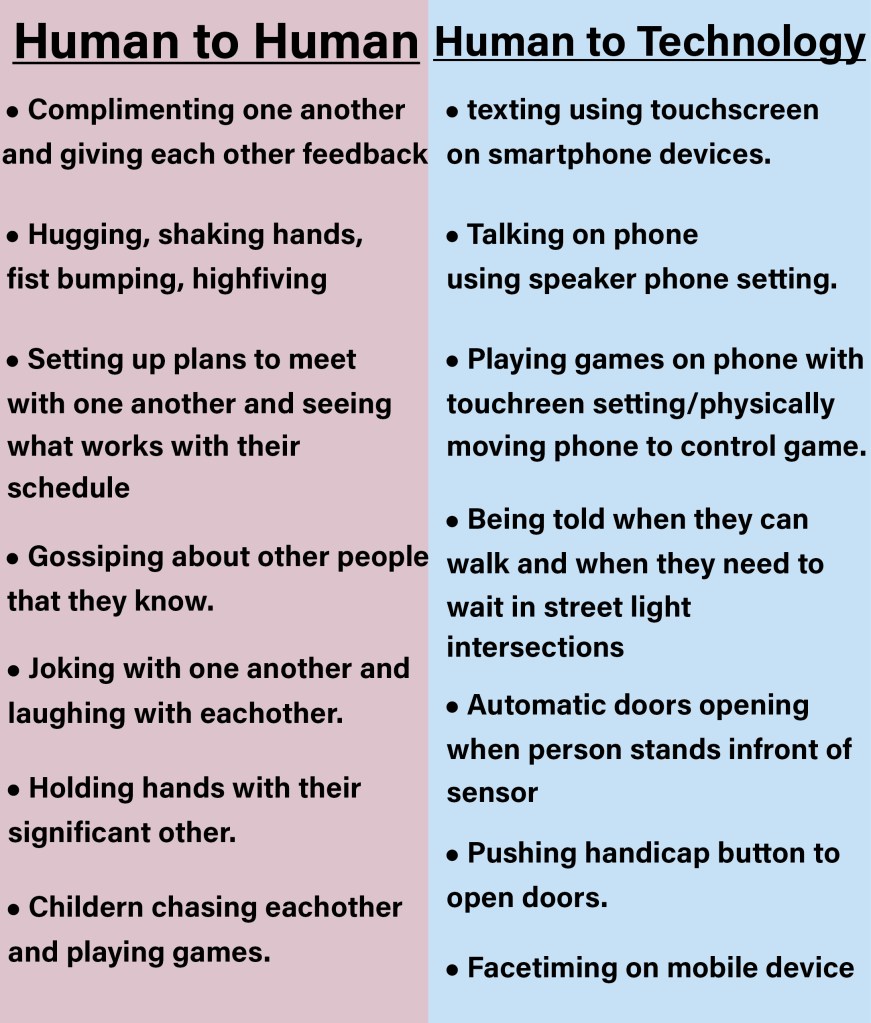
With human capabilities and motivations in mind, what were the strongest themes you discovered?
- There is an emotional connection with humans that computers cannot recreate.
What mismatches did you find in the human-to-technology interaction?
- While the computer can change grammatical errors in writing document apps, the creative forms of writing cannot be copied into a computer format.
What were the top two methods of access (touch, sight, hearing, voice)?
- People with physical disabilities tend to use voice recognition a lot when using a computer due to physical limitations. While technology is advancing with voice recognition software, there is still somewhat of a disconnect from transferring live verbal communication into a digital format.
What’s the human-to-human interaction that informs the behavior of your solution?
- Individuals with communication issues or if they are learning a new language cannot always interoperate what they are verbally trying to communicate with technology.
What’s the design challenge to be solved and the need it addresses?
- The design challenge would be creating a voice recognition software that is intended for people who cannot speak clearly or have trouble communicating their thoughts into words.
Why does it matter to the audience?
- This matters to the audience because certain people with physical limitations or disabilities cannot always interact with a keyboard when using technology. To solve these issues individuals, use voice recognition to turn to communicate with technology. While voice recognition has improved a lot over the years, individuals who cannot speak clearly or have trouble turning their thoughts into words still have trouble using voice recognition.
Empathy Exercise Step 2: Frame
Empathy Exercise step 3: Ideate
Problem 1:
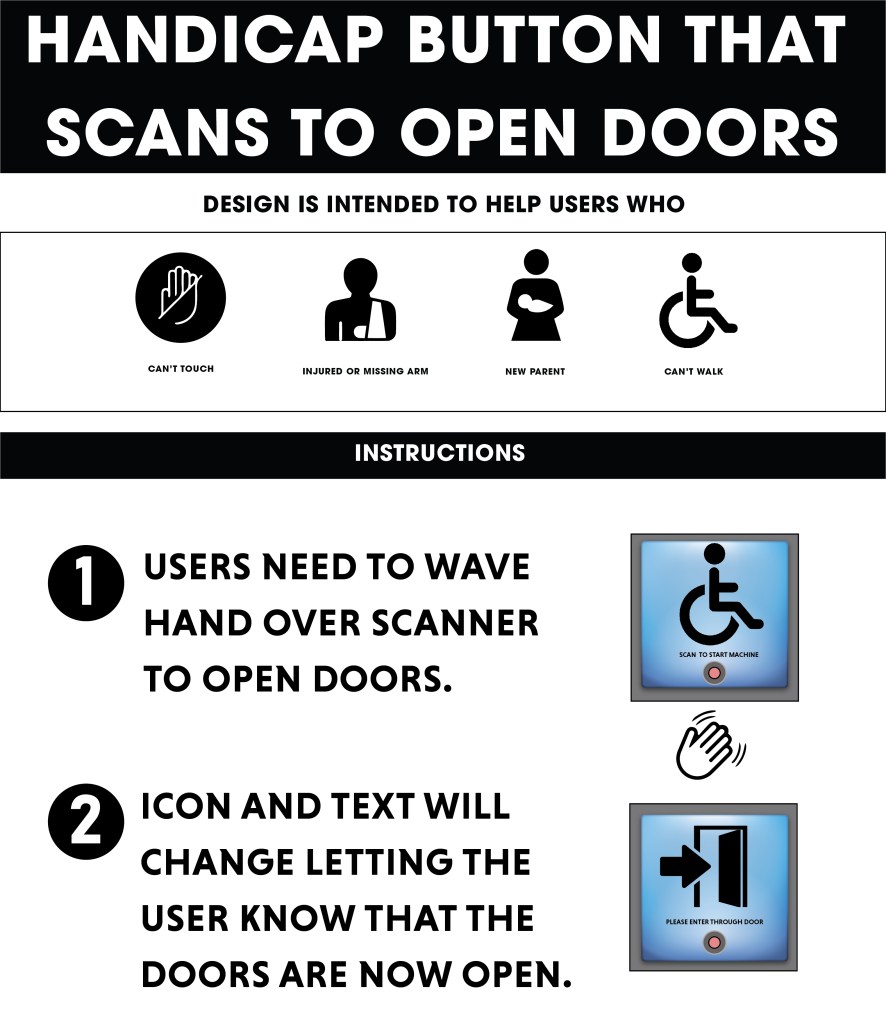
“How might we create a more sanitary way of not having to physically press handicap buttons that open doors?”
Problem 1 Solution
Instead of having individuals having to physically press the handicap buttons to open doors, there could be a sensor the user scans that opens the door.
Problem 2
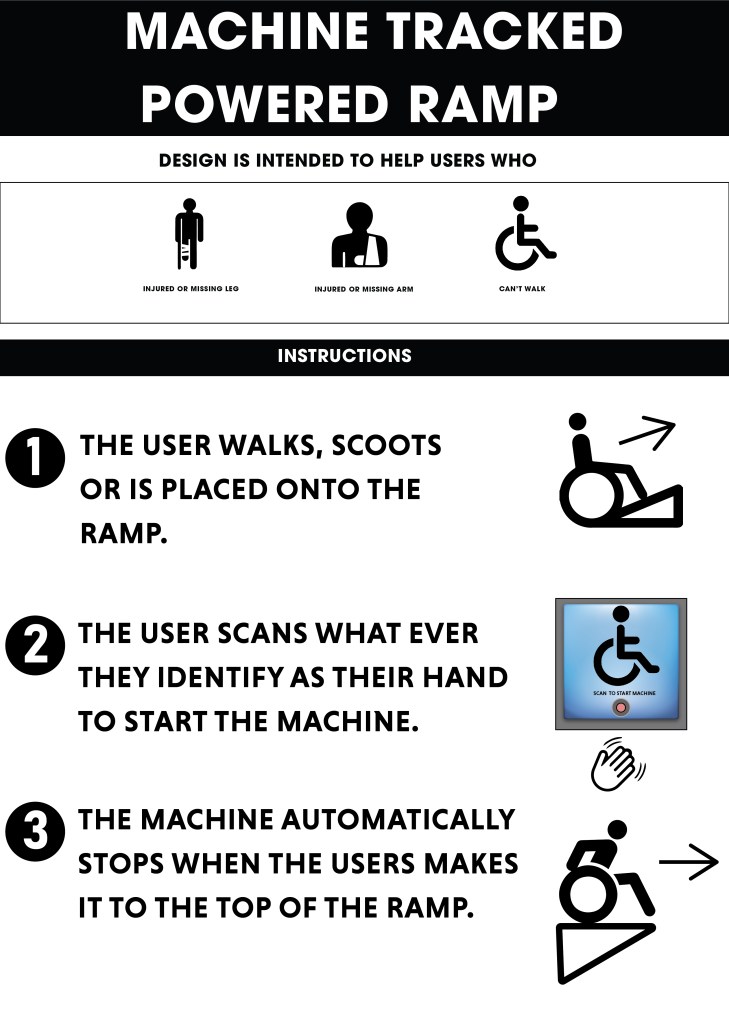
“How might we improve handicap ramps so that there is less of an incline for heavier individuals?”
Problem 2 Solution
Build the ramps with more tractions so that individuals have more stability when using the ramp. The ramp could be like a mini escalator that automatically pulls up the handicapped individuals.
Problem 3
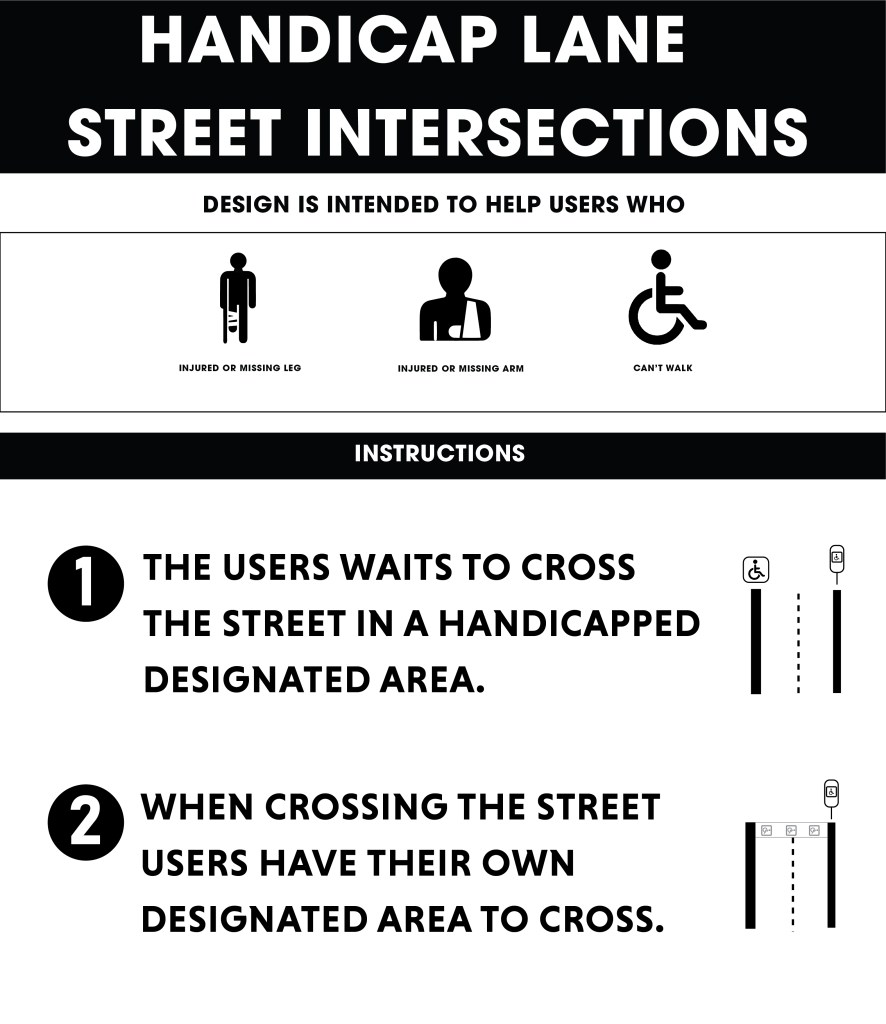
“How might we enable street light intersections to have more room for handicapped individuals, when crossing the street?”
Problem 3 Solution
Much like a bike lane, there could be a designated handicap lane for crossing street intersections.
Empathy Exercise Step 4: Purpose
Microextractions:
Problem 1 “How might we create a more stationary way of not having to physically press handicap buttons that open doors?”
-The user will use their hand or whatever they identify as their hand and place it in front of the sensor button device.
-The sensor will scan their hand and then give the user an icon indicating that the door has now been opened.
Problem 2 “How might we improve handicap ramps so that there is less of an incline for heavier individuals?”
-They will walk or be placed on the tracks. The user will scan their hand to indicate to the machine that they are ready to go up the ramp. A distinctive sound and icon will appear lettering the user know the machine has started. The ramp will then automatically bring the user to the top of the ramp and then automatically stops. An icon and distinctive sound will appear letting the user know they have reached the top and that they cannot enter the facility.
Problem 3 “How might we enable street light intersections to have more room for handicapped individuals, when crossing the street?”
-The handicapped user will have a designated location for them to wait before crossing the intersection. The streetlight will give able body pedestrians the standard streetlight crossing icons as well as the new handicap streetlight crossing icons and sounds. The user will then cross the street through the designated signed handicapped lane until they reach the end of the intersection
Empathy Exercise Step 5: Design Cards
Problem 1 “How might we create a more stationary way of not having to physically press handicap buttons that open doors?”
Problem 2 “How might we improve handicap ramps so that there is less of an incline for heavier individuals?”
Problem 3 “How might we enable street light intersections to have more room for handicapped individuals, when crossing the street?”
Video Link
What is your biggest takeaway from the empathy exercise?
My biggest takeaway from the empathy exercise is learning tasks that might be considered easy to do such as opening a door or crossing the street can be a difficult activity for physically or mentally disabled individuals. I also learned how inclusive design cannot just help the disabled but can also help society as a whole. This is why designing for everyone is the best solution for designers so that new ideas and inventions can be created to make tasks/activates easier for everyone.
Work Cited:
Clarkson, J. (2003). Inclusive Design: Design for the whole population. Springer.
Abascal, J. (2001). Why inclusive design guidelines? (2001). Inclusive Design Guidelines for HCI, 21–32. https://doi.org/10.1201/9781482268317-6 (Links to an external site.)
Warburton, N. (2003). Everyday inclusive design. Inclusive Design, 250–269. https://doi.org/10.1007/978-1-4471-0001-0_16
Microsoft Design. Microsoft. (n.d.). Retrieved April 6, 2022, from https://www.microsoft.com/design/inclusive/

 Alex Lind